WebMO Pro Features
WebMO Pro is a commercial add-on to the freeware WebMO computational chemistry package. It features a variety of computational, visualization, and management enhancements that are suitable for serious education, commercial, or research-level users.
For more information on WebMO Pro pricing or purchasing, you are welcome to contact us at sales@webmo.net.
WebMO Pro Features
In addition to the WebMO Basic features, WebMO Pro adds the following:
- Support for SMP parallel jobs on multi-processor multi-core systems
- Visualization of molecular orbitals and natural bonding orbitals
- Visualization of electron density, electrostatic potential, and electrophilic/nucleophilic surfaces
- Spreadsheet-based import of user accounts
- Improved job organization with user-customizable folders
- Job history tracking to manage computational workflow
- Save text notes associated with each job
- Creation of spreadsheet summaries to compare results from multiple jobs
- Integrated z-matrix and Cartesian coordinate editor
- Coordinate scanning and IRC calculations
- Ab initio molecular dynamics calculations
- Support for multiple remote computational servers
- Integrate with other visualization and analysis programs
- Individual user job calculation templates
- Searching of existing jobs within Job Manager
- Integrated job template editor
Visualization of Molecular Orbitals
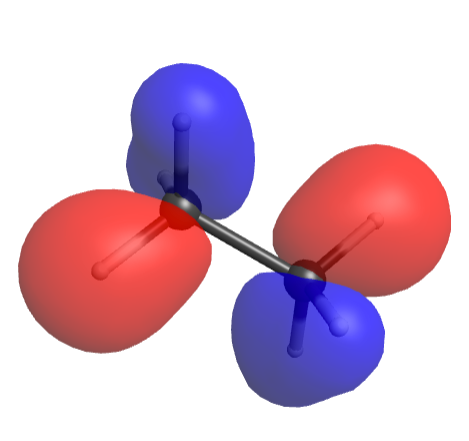
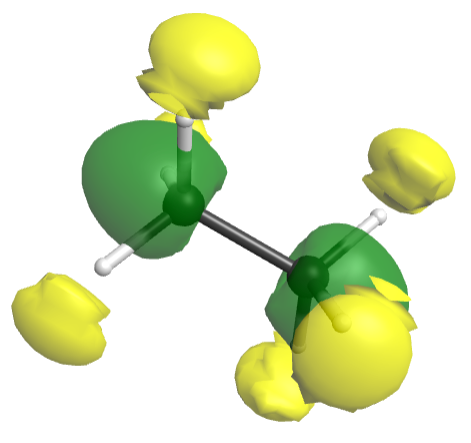
WebMO Pro allows the visualization of computed molecular orbitals. Simply click on the associated "View" icon next to the desired MO on the "View Results" page.
Visualization of Electron Density and Electrostatic Potential

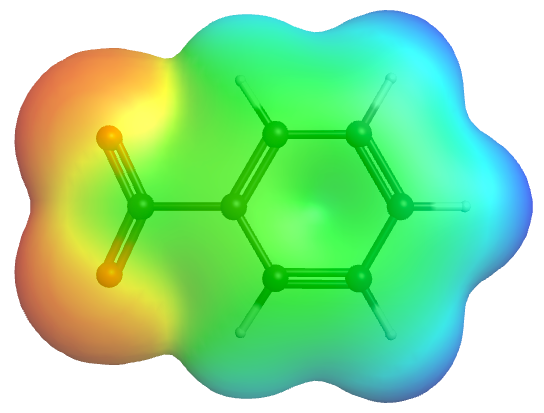
WebMO also allows the visualization of electron density, electrostatic potential, and electrophilic/nucleophilic density mapped onto the electron density.
Folder-based Job Organization
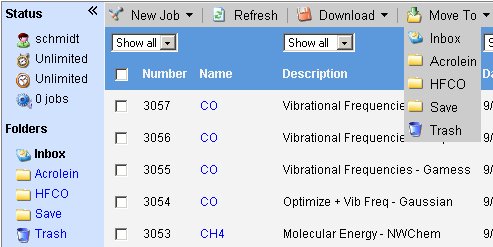
WebMO Pro extends the capabilities of the Job Manager by adding user-definable folders. While freeware WebMO is limited to only an Inbox and a Trash folder, with WebMO Pro users can create folders and subfolders.
This feature is perfect for the serious WebMO users with a variety of concurrent projects. WebMO Pro allows the user to create a folder for each project, thus making jobs easier to locate. In addition, important jobs can be archived without unnecessarily cluttering-up the Inbox.
Text Notes
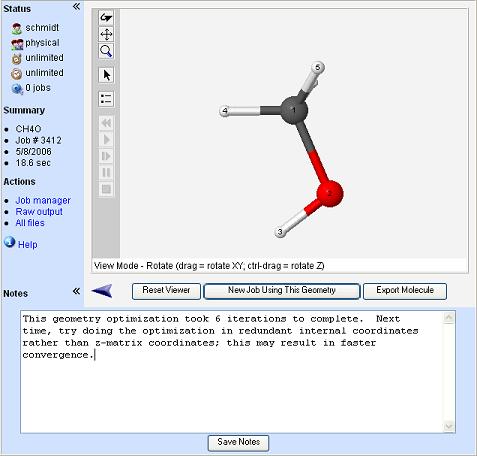
It is often convenient to be able to save information related to a particular computational chemistry job in such a manner that it remains statically associated to a particular job. For example, when calculating a heat of reaction for a particular reaction, it is convenient to store the energies of the reactants with the calculation of the product. The notes feature allows users to store and edit text notes of unlimited size with each job, and access and edit this notes in the 'View Job' page.
Spreadsheet Summaries
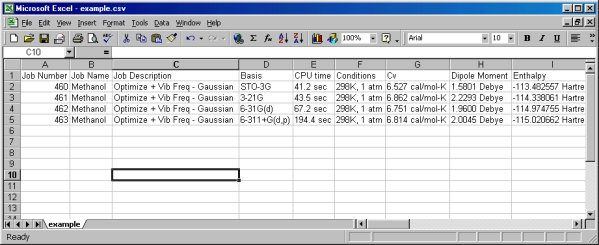
To enable the simple comparison of basis set effects, etc. WebMO Pro adds the ability to create a comma-delimited spreadsheet summary of any number of selected jobs. This spreadsheet contains a summary of all relevant information normally displayed in the 'View Results' page in a convenient column-based format. This format is easily opened for viewing and manipulation by programs such as Excel.
Download an example of the spreadsheet output, comparing basis set effects for methanol.
Integrated Z-Matrix Editor
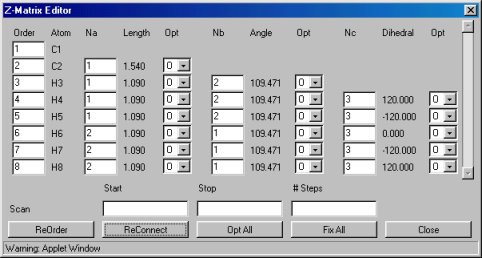
WebMO Pro adds an integrated z-matrix editor, which is accessed through the Tools menu of the WebMO Editor. The z-matrix editor allows complete control over the z-matrix which will be submitted to the computational engine. This flexibility is particularly helpful when setting up partial geometry optimizations (in which some molecular coordinates are held fixed) and coordinate scans.
Coordinate Scanning
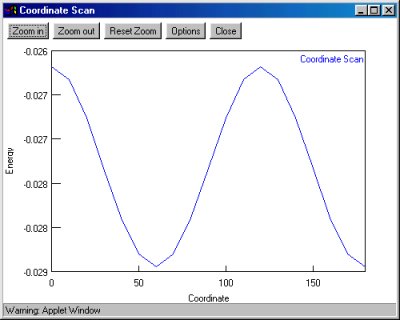
Coordinate scanning is an excellent way to visualize chemical processes (ex: torsional strain in ethane, SN2 reaction) by plotting the energy vs. reaction coordinate. WebMO Pro displays the results of the calculation both as a table and as a plot. Currently, Gaussian, Molpro Mopac, NWChem, Orca, PQS, and PSI support 1-D coordinate scanning. Gaussian, Molpro Mopac, NWChem, and PSI support 2-D coordinate scanning.
Multiple Remote Computational Servers
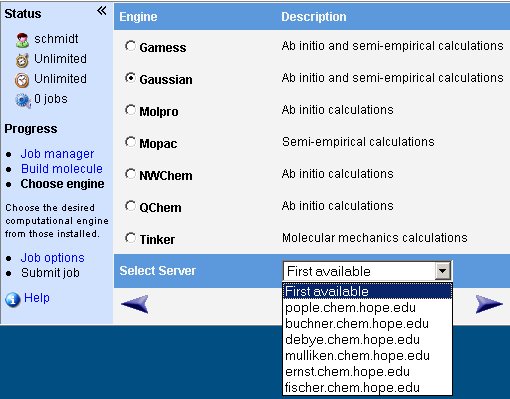
WebMO Pro eliminates the hassle associated with having a dedicated copy of WebMO on each computational server. Rather, with WebMO Pro, users log into a single copy (based on a Web server) and can run jobs on any of the available computational servers. Jobs can be run on a particular computational server, or simply the first available server. This allows users to harness the full power of their server-cluster without a dedicated queuing systems.
Integrate with external visualization programs
One click access to all output files means that it is simple to interface with other, external visualization programs. Simply click and open the output file using the external program. Harness the power of a world of existing computational chemistry visualization utilities from within the easy to use environment of WebMO.
Individual Job Templates with Integrated Editor
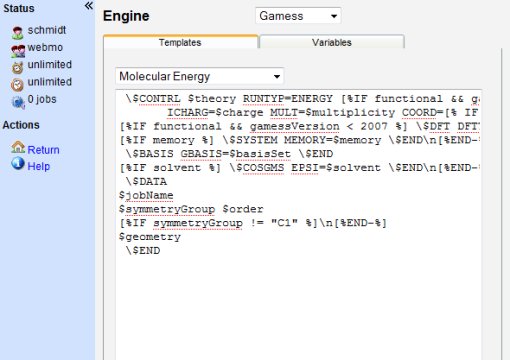
Individual job templates is an extension of the template system found in freeware WebMO. The freeware version of WebMO implements job calculation templates on a system level; all users share a set of common job templates. WebMO Pro extends this idea by allowing users to add their own job templates to those normally available. Thus, each user has unique job calculation templates specific to their work.
Job templates can be added or edited by either the WebMO administrator for system-wide changes or normal users for personal customization using the integrated editing system. This editor makes it simple to customize existing job templates, or create new job templates for existing applications. New custom variables can also be defined, which will display in the corresponding job options page.
Searching of existing jobs within Job Manager
Jobs can be now be comprehensively searched from within the Job Manager to locate existing jobs. Searches can be limited to all jobs, jobs in a current folder, or to the currently filtered jobs. The WebMO administrator can search ALL jobs, or restrict searches by filter.